A stock sheet that updates itself
Most restaurants track stock in a notebook or a spreadsheet that is accurate on Monday and fiction by Friday. Here the count lives next to the order flow: every QR table order, counter bill and delivery order reduces the linked inventory item, so the number you look at is the number after today's service.
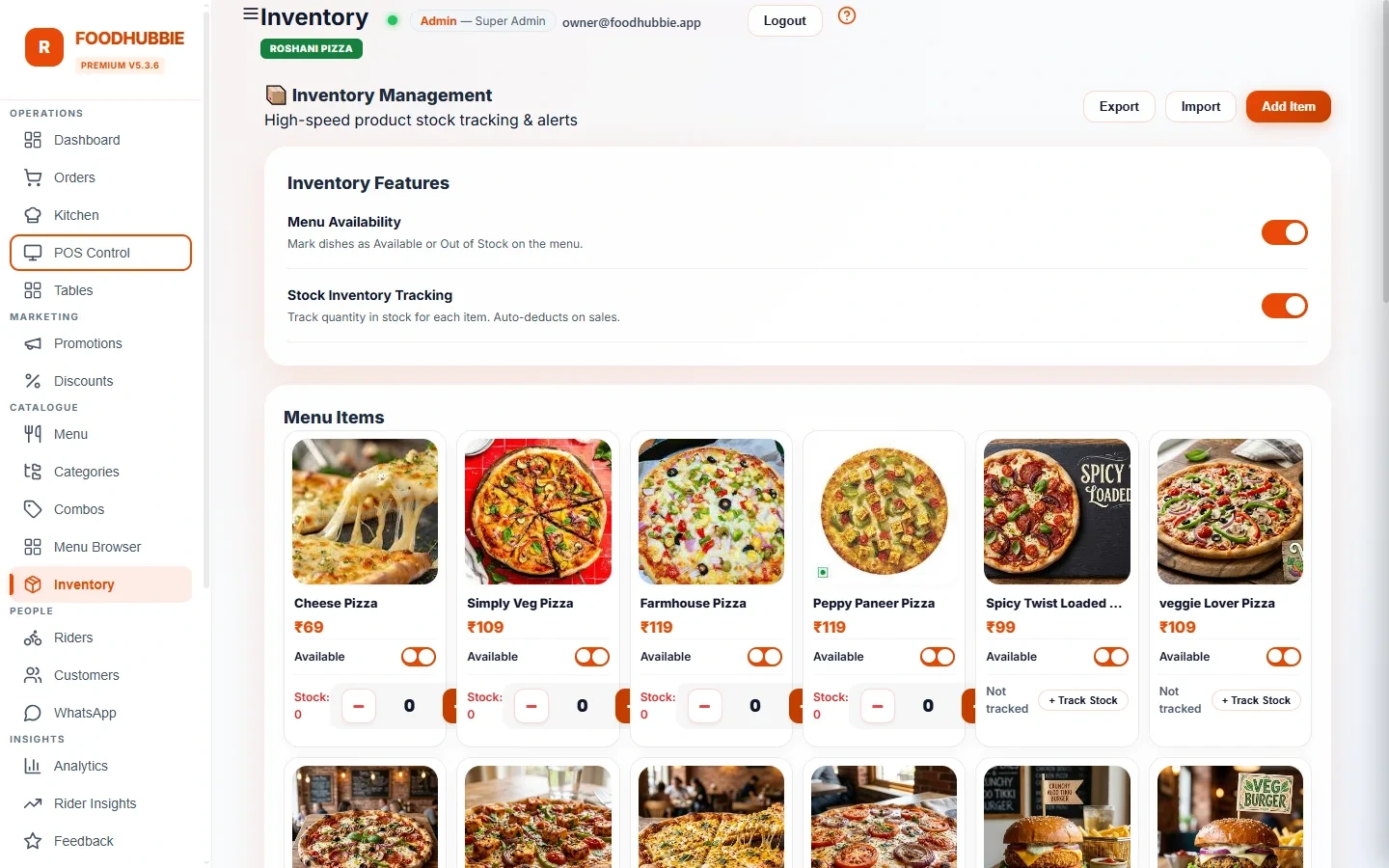
What it does on a normal day
Dishes are linked to stock items, so a sale reduces the count without anyone touching a spreadsheet. Delivery and dine-in are counted the same way.
Each item has a minimum. When stock reaches it the item is marked low; close to it, it reads reorder-soon — so the purchase list is written before the rush, not during it.
Switch a dish's availability off and it stops appearing as orderable on the QR menu. No "sorry, that's finished" conversations from the kitchen to the counter.
Bring your current list in as CSV — name, SKU, stock, minimum, unit, supplier, cost — up to 500 rows at a time. You do not re-type last month's count.
Each item carries its unit cost, which is what turns "we sold ₹40,000" into "we sold ₹40,000 and spent this much on stock".
Manual adjustments and low-stock crossings go into the audit trail, with who changed what — useful when the count and the shelf disagree.
Spreadsheet vs built-in inventory
A spreadsheet is free and familiar. It is also a second place to type the same numbers, and it never knows what was ordered.
| Spreadsheet | FoodHubbie inventory | |
|---|---|---|
| Updating the count | Manually, at the end of the day | Deducted as orders are placed |
| Knowing what is nearly out | Depends on who checks the sheet | Low-stock and reorder-soon flags per item |
| Stopping a sold-out dish | Tell the waiter, hope it reaches the counter | Availability toggle — removed from the menu |
| Cost of goods | Maintained separately, drifts | Unit cost sits on the item itself |
| Who changed what | Nobody knows | Adjustments recorded in the audit log |
| Extra cost | Free | Included in the standard plan |
Inventory feeds the same reports as billing — see POS and billing for how day-close numbers are put together, and pricing for what the plan includes.
Set it up once, in four steps
CSV from your existing sheet, or add items one at a time: name, unit, supplier, cost, current stock.
The minimum is your reorder line. It is the number of units you never want to go below before the next delivery.
Connect a dish to the stock it consumes so sales deduct the right item automatically.
Low and reorder-soon items are already separated from the rest. Top up, adjust the count, or toggle a dish off for the evening.
Inventory questions, answered plainly
Does stock deduct automatically when an order is placed?
Yes. When a dish is linked to an inventory item, placing an order reduces that item by the quantity sold — from QR table orders, POS bills and delivery orders alike. If no link exists, the system matches the inventory item by name.
Do I need a barcode scanner or special hardware?
No. Stock counts are adjusted in the dashboard on any phone, tablet or laptop, and an existing stock sheet can be imported as CSV. There is no scanner or proprietary hardware to buy.
Can I import the stock sheet I already keep in Excel?
Yes. Export it as CSV with the columns name, sku, stock, threshold, unit, supplier and cost, then import it — up to 500 rows per import. Units, suppliers and per-item cost come in with the stock.
What happens when an item falls below its minimum?
The item shows a low-stock badge, and an item that is close to its minimum is flagged reorder-soon. Crossing the minimum raises a warning in the dashboard and writes it to the audit log, so the change is on record.
Can I stop taking orders for a dish that has run out?
Yes. Each dish has an availability toggle tied to its stock item. Switch it off and customers can no longer order it from the QR menu; the kitchen and POS see the same state.
Know what is in the store before service starts
Inventory is part of the standard plan — the same ₹1–5 per order, ₹500 one-time setup, no separate module.
Start free trial → WhatsApp us